Welding Training Simulator: Clear Overview and Expert Insights
Good welding instruction depends on more than watching an instructor and repeating a joint until it looks acceptable A learner also needs immediate feedback a safe place to.
Modern systems can reproduce common welding processes joint positions torch or gun movements and visual cues through a screen augmented-reality headset or virtual-reality setup The technology is useful but.
I will explain what a welding training simulator does, how it fits into a complete welding program, which features deserve attention, and where simulation still falls short. The goal is to help a school, employer, or individual learner make a practical decision without confusing digital practice with qualification on real equipment.
What Is a Welding Training Simulator?
A welding training simulator is a digital training system that recreates welding tasks without requiring a live arc electrode consumption shielding gas or metal workpiece for every practice.
Most systems simulate several elements of a welding operation:
- Joint type, including butt, lap, corner, and T-joints
- Welding position, such as flat, horizontal, vertical, and overhead
- Process-specific controls for methods such as GMAW, GTAW, SMAW, or FCAW
- Travel speed, work angle, travel angle, and distance from the workpiece
- Arc length, contact-tip-to-work distance, torch height, or electrode angle
- Bead placement, heat input indicators, and continuity of travel
- Workpiece geometry and visual access to the weld area
Some platforms present a projected or computer-generated workpiece. Others use virtual reality, augmented reality, or a mixed-reality overlay that places a digital weld path on a physical coupon. A system may score the exercise immediately, replay the motion, identify deviations, and recommend another attempt.
The central purpose is not to create a realistic-looking game. It is to isolate specific skills, provide repeatable practice, and give a learner useful information before material, equipment, and instructor time are consumed.
How the Technology Works
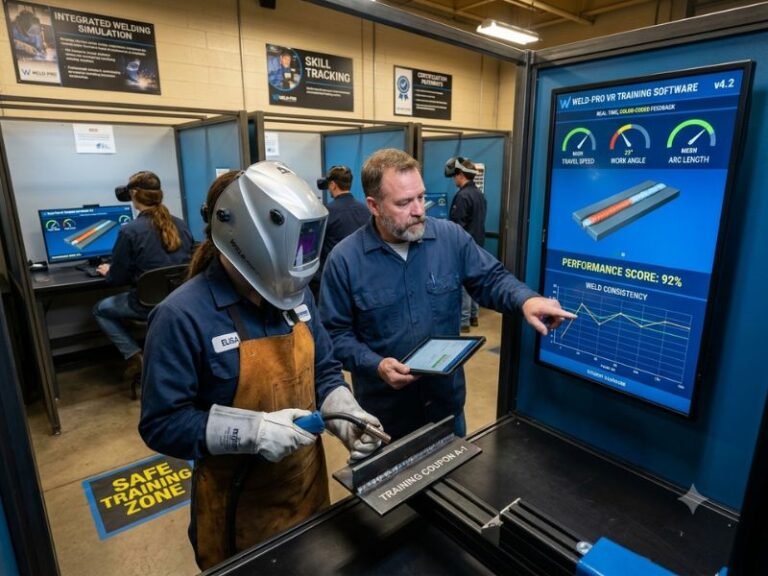
A simulator combines hardware, tracking, software, and instructional content. The hardware captures the learner’s movements. Tracking sensors measure the position and orientation of the tool. Software compares those movements with a defined target and displays the result as a score, visual path, color-coded warning, or written feedback.
Hardware and motion tracking
Entry-level systems may use a handheld controller or a replica welding tool. More advanced systems can include a realistic torch, gun, electrode holder, helmet, work table, and positioner. Cameras, inertial sensors, magnetic tracking, or headset-based tracking detect how the learner moves through space.
Hardware realism matters because welding requires coordinated motion A light game controller cannot reproduce every physical demand of a production torch At the same time perfect physical duplication.
Visual and audio feedback
Welding simulators commonly represent the arc, puddle, joint, bead, sparks, and surrounding work area digitally. Audio may signal an incorrect angle, excessive distance, unstable movement, or another deviation. A learner can often pause the exercise and review the path from multiple viewpoints.
Feedback should be specific enough to support correction. “Low score” is weak instruction. “Travel speed exceeded the target range during the vertical-up pass” gives the learner a clear adjustment for the next attempt.
Performance records
Many systems store individual attempts, scores, time on task, error categories, and completion status. This creates a record that an instructor can use to identify patterns. A learner who repeatedly maintains the correct angle but moves too quickly needs different coaching from someone who loses tool orientation at the start of every joint.
Performance data is most useful when it supports a human decision. A score should not replace observation, conversation, or hands-on evaluation.
What Skills Can a Simulator Teach?
Simulation works best for skills that can be observed, measured, repeated, and connected to a defined target. It can establish basic habits before the learner deals with arc brightness, heat, smoke, noise, molten metal, and the physical resistance of a real setup.
Position and tool control
A learner can practice holding a consistent work angle, travel angle, and distance from the joint. These relationships are easy to describe but difficult to maintain while moving along a weld. Repetition with immediate visual feedback helps turn abstract instructions into a physical routine.
Travel speed and bead placement
Travel speed affects bead shape, penetration, heat distribution, and the ability to remain on the intended joint line. A simulator can show whether the learner moves too slowly, too quickly, or inconsistently. It can also reveal wandering, stopping, starting, or drifting away from the seam.
Welding positions
Flat welding is often easier for beginners than vertical or overhead work. A simulator allows a learner to experience changing joint orientation without immediately facing the hazards of falling spatter, awkward body position, or an uncontrolled molten puddle. This is valuable as preparation, not as a replacement for live-position practice.
Process familiarity
Software can introduce controls and terminology associated with different processes. A learner may practice selecting settings, identifying a joint, preparing a movement path, or responding to an incorrect setup. Such exercises can improve readiness for shop instruction, although actual arc behavior and machine response must still be learned on the relevant equipment.
Visual inspection habits
Some systems let students inspect a simulated bead and compare it with examples of acceptable or unacceptable results This can reinforce concepts such as undercut excessive convexity lack.
Benefits of Welding Simulation
The strongest benefit is controlled repetition. A learner can repeat one movement many times without cutting another coupon, preparing a new joint, or waiting for equipment to become available. That efficiency can make introductory instruction more active and less wasteful.
Safer early practice
Simulation removes the live arc, hot metal, fumes, ultraviolet radiation, compressed gas, and many other hazards associated with welding. It gives a novice space to learn basic orientation before handling energized equipment. The environment is safer, but it still requires supervision, especially when a simulator is installed near a working shop.
Immediate, objective feedback
Human instructors can provide excellent feedback, yet a single instructor may not observe every learner continuously. A simulator records each attempt and provides consistent measurements for the factors it is designed to track. This can help expose problems that feel minor to the learner but occur repeatedly.
Lower material consumption
Digital attempts do not consume filler metal, electrodes, shielding gas, grinding wheels, or metal coupons. A facility can reserve physical materials for exercises that require the distinct sensory and mechanical experience of live welding.
Consistent orientation for new learners
A simulator can present the same introductory task to every student. That consistency supports a baseline assessment and helps instructors distinguish a knowledge gap from a hand-control problem. It can also provide extra practice to students who need more repetition without holding back the entire class.
Useful training records
Digital records can show whether a student completed assigned exercises and improved in specific categories. Employers may use this information as part of onboarding or refresher instruction. These records should be treated as training evidence, not as proof that a person is qualified for every welding task.
What a Simulator Cannot Replace
Simulation has clear limits. A learner must eventually experience the physical conditions that software can only approximate. The real arc produces light, sound, heat, fumes, spatter, and changing puddle behavior. A real workpiece has tolerances, contamination, fit-up variation, distortion, and surface conditions that may not exist in a digital exercise.
Simulation also cannot fully reproduce body fatigue, restricted access, awkward fixtures, glove thickness, helmet visibility, or the tactile feedback of a tool interacting with a joint. These factors influence production performance and safety.
Most importantly, simulator completion does not automatically equal certification or qualification. Qualification requirements depend on the employer, training provider, governing code, contract, or applicable standard. A student may perform well in a digital exercise and still need supervised live practice, testing, and documented approval.
I recommend treating a simulator as one layer in a blended program:
- Learn terminology, safety, equipment functions, and joint fundamentals.
- Practice basic tool control and movement in simulation.
- Transfer those movements to cold equipment or non-energized setup drills.
- Perform live welding under qualified supervision.
- Inspect, test, and correct real welds.
- Complete any required performance qualification or employer assessment.
Types of Welding Training Simulators
Screen-based systems
A screen-based simulator displays a virtual workpiece and usually uses a tracked tool or controller. These systems can be easier to deploy because they do not require a headset. They are often suitable for classrooms, introductory exercises, and basic movement analysis.
Virtual-reality systems
Virtual-reality systems place the learner inside a computer-generated environment viewed through a headset. They can create a stronger sense of spatial orientation and allow practice around complex workpieces. The tradeoffs may include headset comfort, motion sensitivity, equipment maintenance, and the need to manage shared hardware carefully.
Augmented-reality and mixed-reality systems
Augmented-reality systems overlay digital guidance on a physical tool, coupon, or workspace. This approach can connect the learner’s real hand position with a projected path or instructional prompt. It may be useful when the goal is to retain some physical context while adding digital feedback.
Immersive welding booths
Some training installations replicate a booth, work table, helmet, and welding tools while using projection or tracked visuals. A more complete setup can improve posture and workspace awareness. It also costs more and requires sufficient floor space, technical support, and a clear maintenance plan.
How to Choose the Right Simulator
The best choice starts with the training objective, not the most impressive demonstration. A school teaching first-semester fundamentals may need reliable movement tracking and instructor reporting. An industrial employer may prioritize job-specific joints, process controls, multilingual content, user management, and integration with an existing learning system.
Match the system to the welding process
Confirm which processes the system actually supports and how deeply it supports them. A platform may display several process names but offer limited control over the variables that matter for a particular course. Ask whether the simulator covers the required joint types, positions, materials, consumables, and setup conditions.
Check the feedback model
Find out exactly what the software measures. Useful categories may include tool angle, travel speed, path accuracy, distance, arc length, and start-stop technique. Determine whether an instructor can adjust acceptable ranges or assign different difficulty levels.
A polished animation is not the same as valid instructional feedback. I would ask for a detailed demonstration of the instructor dashboard and a sample learner report rather than judging the system only by its graphics.
Evaluate physical realism
Consider the weight, balance, grip, trigger, cable movement, helmet, and workpiece orientation. Physical realism should serve the lesson. A highly realistic tool is valuable if the course teaches production technique; it may be unnecessary if the initial objective is simply understanding joint geometry.
Review curriculum and support
Hardware alone does not create a course. Look for lesson plans, instructor resources, assessments, troubleshooting guidance, software updates, and technical support. Ask how the vendor trains instructors and how quickly replacement parts can be obtained.
Consider access and total cost
Purchase price is only one part of the budget. Include software subscriptions, replacement controllers, headset sanitation, warranties, installation, staff training, room preparation, network requirements, and service contracts. A less expensive system that sits unused is not a good value.
Using a Simulator in a Training Program
Simulation is most effective when every exercise has a defined purpose and a clear transfer to live welding. A simple instructional sequence can prevent students from chasing scores without understanding the skill behind them.
Start with orientation
Explain the equipment, interface, scoring categories, and expected behavior before assigning a difficult weld. The learner should know whether the system values path accuracy, speed, angle, distance, or a combination of factors. I would also explain that a high score reflects performance within the software’s model, not universal welding competence.
Use short, focused exercises
Assign one or two variables at a time. For example, a first exercise might focus on following the joint line while maintaining a basic angle. A later exercise can add travel-speed control and position changes. Short tasks make errors easier to identify than a long exercise with too many demands.
Require reflection after each attempt
Ask the learner to identify what happened before showing every answer. Did the tool move too quickly? Did the angle change near the end? Did the learner lose alignment while looking at the puddle? Reflection turns feedback into deliberate practice.
Transfer quickly to real equipment
Digital practice should lead to a live task while the movement is still familiar The instructor can then compare what transferred and what did not A learner may.
Track improvement, not just ranking
Scores are more useful when compared with a learner’s earlier performance and specific objectives. Avoid turning training into a competition that rewards speed over control. Safe, repeatable technique should remain more important than finishing first.
Common Mistakes to Avoid
Buying for visual appeal
Realistic sparks and attractive graphics can make a demonstration memorable, but they do not prove that the system teaches the needed skills. Verify measurement accuracy, lesson quality, and reporting before focusing on appearance.
Using simulation as a substitute for shop time
Simulation can reduce waste and improve preparation, but it cannot provide every sensory and physical demand of live welding. A program that removes too much hands-on practice may produce learners who understand the interface but lack production readiness.
Ignoring instructor involvement
Automated feedback cannot interpret every error. A learner may receive a poor result because of posture, misunderstanding, equipment setup, or a software limitation. Instructor review adds context and helps prevent the learner from practicing the wrong correction.
Treating scores as certifications
A simulator score is a measurement generated by a training platform. It is not automatically an industry credential, code qualification, license, or employer authorization. Course records should clearly distinguish practice results from formal qualification documents.
Failing to connect digital and physical terminology
If the simulator calls a control or joint feature by one name and the shop uses another, confusion can follow. Align the vocabulary across lessons, machine labels, assessment forms, and instructor explanations.
Neglecting accessibility and comfort
Headsets, handheld tools, visual displays, and audio alerts may not work equally well for every learner. Consider height adjustment, left- or right-handed use, vision needs, motion sensitivity, hearing access, and the ability to pause without losing progress.
Safety and Data Considerations
A simulator reduces many welding hazards, but it does not eliminate training responsibilities. The room should be arranged to prevent trips, collisions, and unsafe interaction with nearby shop activity. Physical tools should be inspected, cables secured, and shared headsets cleaned according to the manufacturer’s instructions.
Training providers should also decide how learner data is collected, stored, and shared. Performance reports may include names, images, completion records, or instructor comments. Access should be limited to people with a legitimate training need, and retention practices should be explained clearly.
Live welding still requires instruction in ventilation, protective clothing, helmets, gloves, fire prevention, electrical safety, compressed gases, equipment inspection, and emergency procedures. A simulator can introduce these subjects or reinforce them, but it should not create a false sense that welding is risk-free.
Who Benefits Most From a Welding Simulator?
Beginning students can use simulation to become familiar with joint geometry, tool orientation, and basic movement before producing an arc. This can reduce anxiety and make the first live session more productive.
Experienced welders may use simulation for refresher training, unusual positions, procedural changes, or pre-job practice. The value is higher when the exercise resembles a real task rather than a generic demonstration.
Employers can use simulators during hiring previews, onboarding, remedial training, or continuing education. Care is necessary during hiring: a digital score should be only one factor because it may not measure physical stamina, judgment, safety habits, or experience with the employer’s actual equipment.
Technical schools and community colleges may benefit from shared access. A simulator can give students additional practice when booths, instructors, or consumables are limited. It can also support remote theory instruction, provided that hands-on welding remains part of the program.
Frequently Asked Questions
What does a Welding training simulator teach?
It can teach and measure movement-related skills such as tool angle, travel speed, distance, path accuracy, joint alignment, and welding-position awareness. Some systems also teach process controls, joint identification, setup decisions, and visual inspection. The exact capabilities depend on the hardware and software.
Can a welding simulator replace real welding practice?
No. It can prepare a learner for live welding and reduce unnecessary material use, but it cannot fully reproduce arc behavior, heat, fumes, spatter, puddle response, fit-up variation, or physical fatigue. Real equipment and supervised practice remain necessary.
Does simulator practice qualify someone to weld professionally?
Simulator practice alone does not establish professional qualification. Qualification depends on the applicable employer requirements, training program, contract, code, or standard. A learner may need supervised live welding, inspection, testing, and formal documentation.
Are virtual-reality systems better than screen-based simulators?
Not in every situation. Virtual reality can provide stronger spatial immersion, while screen-based systems may be simpler to deploy, easier to share, and sufficient for basic movement objectives. The better option is the one that matches the curriculum, learners, budget, and required feedback.
How should instructors use simulator scores?
Scores should identify patterns and guide coaching rather than serve as the only pass-or-fail measure. An instructor should review the relevant movement, compare it with the learner’s goal, and confirm improvement on real equipment.
What should a buyer ask a simulator vendor?
Ask which welding processes, joints, positions, and variables are supported; how tracking accuracy is maintained; what reports instructors receive; whether content can be customized; what support and updates cost; and how the system fits existing safety and qualification procedures.
Conclusion
A welding training simulator is most valuable as a structured practice tool inside a broader welding program It can provide safe repetition immediate feedback useful performance records and.