Robotic Welding Programming Training: Complete Guide and Facts
A production cell can look impressive until a robot stops at the wrong angle, misses a joint, or repeats a defect with perfect consistency. In that moment, the value of robotic welding is determined less by the robot’s brand than by the programmer’s ability to build, verify, and improve the weld process.
Robotic welding programming training teaches the practical skills behind that process: creating robot motion, defining weld instructions, setting coordinate systems, managing tooling, and correcting problems safely. It is relevant to welders moving into automation, maintenance technicians, manufacturing engineers, and employers developing an in-house automation team.
I will explain what this training includes, how a typical learning path works, what to compare between programs, and which mistakes can undermine results. The goal is to help a prospective student or hiring manager choose training that leads to reliable production rather than only a certificate.
What Robotic Welding Programming Training Covers
Robotic welding programming training prepares a person to operate and program an industrial robot for welding applications. It combines robot-controller instruction with welding fundamentals, fixture knowledge, production safety, and troubleshooting.
A trainee usually learns how to:
- Jog a robot through its axes and coordinate systems
- Create, modify, save, and recover robot programs
- Define approach, weld, and retract positions
- Set welding parameters and control weld schedules
- Use work objects, tools, frames, and payload data
- Manage wire feeding, shielding gas, arc initiation, and crater fill
- Test programs in manual, reduced-speed, and automatic modes
- Diagnose common faults involving motion, arc starting, sensing, and equipment
- Make controlled changes without damaging the robot, torch, fixture, or workpiece
The exact content depends on the robot manufacturer and the training provider. A course using a FANUC, ABB, Yaskawa Motoman, KUKA, or OTC Daihen system may use different programming terms and controller menus. The underlying principles remain similar, but controller-specific practice matters because programming methods are not interchangeable in every detail.
Why This Training Matters in Manufacturing
Robotic welding can improve repeatability, productivity, operator ergonomics, and process consistency. Those benefits do not appear automatically after installing a robot. A poorly programmed cell can create excessive spatter, undercut, missed joints, collisions, long cycle times, and difficult maintenance problems.
Programming skill connects the physical weld process to the automated system. The programmer must understand how torch angle, travel speed, work angle, wire position, joint fit-up, and robot motion affect the finished weld. A technically correct robot path can still produce a poor weld if the process assumptions are wrong.
Training also reduces dependence on trial and error. A qualified programmer can identify whether a problem comes from a position, a coordinate frame, a weld schedule, a fixture, a sensor, or the base material. That distinction saves production time and prevents unnecessary changes to several variables at once.
For an employer, the return on training often depends on the number of robotic cells, product variation, downtime costs, and the availability of outside integrators. For an individual, the value depends on whether the course builds skills that match the robots and welding processes used by local employers.
Core Skills Taught in a Quality Program
Robot movement and coordinate systems
Robot programming starts with controlled movement. Trainees learn joint motion, linear motion, and sometimes circular or coordinated motion. They also learn why a robot may reach the same physical location through different joint configurations.
Coordinate systems are especially important. A tool frame describes the welding torch and its orientation. A user frame, work object, or work coordinate system describes the part or fixture. A base or world frame provides a broader reference. If a frame is incorrectly defined, an apparently small change can shift every programmed point.
A strong course teaches more than button sequences. I would look for practice defining, checking, and intentionally changing frames so a student understands the relationship between the robot, torch, fixture, and part.
Teaching points and weld paths
Students learn to create points for approach, start, weld travel, weave, end, and retract positions. They also learn how to maintain a safe clearance from clamps, fixtures, and nearby equipment.
Point placement affects more than reachability. It influences torch angle, arc length, travel speed, joint access, and the robot’s ability to transition smoothly between segments. A path that technically reaches the joint may still create an unstable or inaccessible welding position.
Good instruction includes path review at reduced speed, not merely recording points while holding the teach pendant. It should also explain how to make a small correction without unintentionally changing a critical approach or clearance point.
Welding process integration
Robot programming and welding setup must work together. Courses commonly address gas metal arc welding, including short-circuit, spray, and pulsed transfer where applicable. Some programs also cover flux-cored arc welding or other processes used in industrial production.
Instruction may include:
- Arc start and arc end commands
- Weld schedules and parameter selection
- Wire feed speed and voltage relationships
- Travel speed and weave settings
- Shielding gas selection and flow considerations
- Burnback, crater fill, and touch sensing
- Through-arc seam tracking or laser-based sensing where available
The most useful training explains how a change in one setting can affect the entire weld. For example, increasing travel speed may reduce heat input but can also affect penetration and bead size. The correct adjustment depends on the joint, material, wire, shielding gas, and production specification.
Safety and controlled operation
Safety must be integrated into programming practice. A robotic welding cell combines moving machinery, electrical energy, heat, ultraviolet radiation, fumes, compressed gas, wire feed equipment, and potentially stored energy.
Training should cover the purpose and limits of guarding, interlocks, emergency stops, mode selection, enabling devices, lockout/tagout responsibilities, and safe approach procedures. A student should know the difference between teaching a point at reduced speed and proving a program in automatic production.
Safety instruction does not replace site-specific procedures or formal employer authorization. It gives the trainee a foundation for following those procedures correctly.
A Typical Robotic Welding Programming Workflow
A practical program follows a repeatable sequence. The names of commands differ by controller, but the decision process is broadly consistent.
- Review the part and fixture. Confirm joint locations, material, fit-up, clamps, access, and any areas that could interfere with torch movement.
- Confirm equipment status. Check the robot, torch, wire, gas, grounding, positioner, safety devices, and consumables before creating motion.
- Define tools and frames. Verify the torch center point, tool orientation, work frame, payload, and fixture reference.
- Plan the path. Determine approach, weld, transition, and retract movements before teaching every individual point.
- Teach positions. Record points with suitable torch angle, clearance, and access. Use the correct motion type for each segment.
- Assign weld instructions. Add the correct weld schedule, arc-start logic, travel speed, weave, crater fill, and sensing functions.
- Dry-run the program. Test robot movement without initiating an arc when appropriate. Check for collisions, singularities, cable strain, and fixture clearance.
- Prove the weld at controlled speed. Use the required safety mode and observe arc initiation, travel, termination, and part stability.
- Inspect the result. Evaluate bead location, size, penetration indicators, spatter, appearance, and compliance with applicable specifications.
- Document and release the program. Record changes, version information, process settings, and any limits or special instructions.
This workflow matters because a robot can execute an incorrect program consistently. Verification must happen before full-speed production, and weld quality must be evaluated separately from motion success.
Classroom, Lab, and Online Training Options
Manufacturer training
Robot manufacturers and authorized training centers often provide controller-specific courses. These programs are useful for people who already know which robot brand they will use. They typically emphasize pendant operation, controller functions, alarms, frames, and programming conventions.
The limitation is that a controller course may not teach enough welding process knowledge. A student who can create a path still needs to understand joint preparation, consumables, weld defects, and process control.
Community college and technical school programs
Technical schools may combine robotic welding, manual welding, industrial maintenance, and automation fundamentals. This format can provide broader preparation, especially for someone entering the field without prior manufacturing experience.
Before enrolling, I would verify the actual lab equipment, the amount of hands-on time, class size, and whether students program real industrial controllers. A course advertised as robotic welding may focus mainly on machine operation or welding simulation.
Employer-sponsored training
Employer training can be highly relevant because it uses the company’s robots, fixtures, part families, welding procedures, and maintenance practices. It may also allow a trainee to apply lessons directly to production.
However, informal instruction can leave gaps. An employee may learn one cell’s workarounds without learning coordinate systems, program structure, documentation, or safe recovery methods. A written curriculum and skills checklist make internal training more consistent.
Online and virtual courses
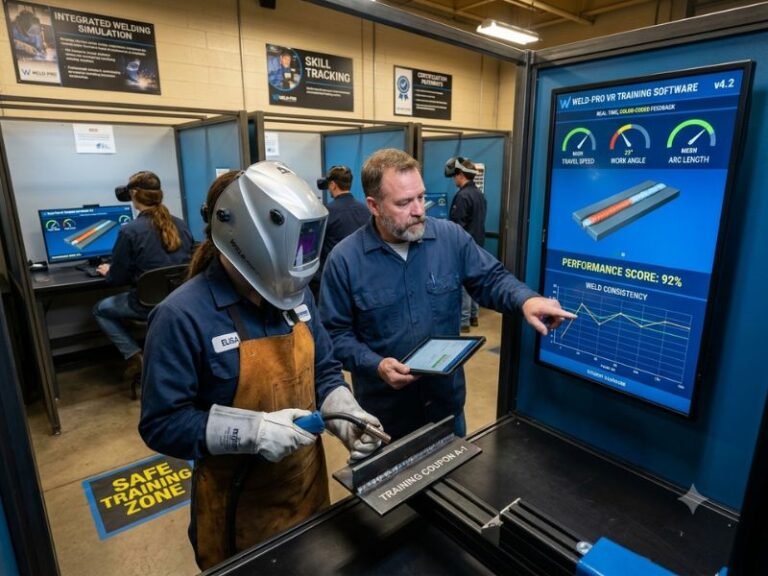
Online training is convenient for terminology, theory, safety concepts, and controller navigation. Simulation software can help a learner understand motion planning without risking physical equipment.
Online-only instruction has clear limits. It cannot fully reproduce torch setup, fixture variation, cable management, arc behavior, physical clearance, or the judgment required during a live weld. I view online study as a useful supplement or starting point, not a complete substitute for supervised hands-on practice.
| Training format | Best use | Main limitation |
|---|---|---|
| Manufacturer course | Learning a specific robot controller | May provide limited welding-process depth |
| Technical school | Building broad automation and welding foundations | Equipment may not match a target employer |
| Employer training | Learning a company’s actual cell and products | Can be narrow or informal without documentation |
| Online or simulation course | Studying concepts and practicing basic logic | Limited physical and arc-welding experience |
How to Choose a Training Program
I recommend evaluating a program against the work the student expects to perform. A short course can be appropriate for an experienced welder learning one controller, while a beginner may need a longer sequence covering welding, electricity, robotics, and industrial safety.
Check the hands-on content
Ask how much time each student spends at a teach pendant and how many people share one robot. Find out whether students program original parts or simply follow a demonstration. Hands-on time should include creating points, editing paths, testing programs, responding to alarms, and inspecting weld results.
Match the controller and equipment
Look for training on the controller brands used by target employers. A course on one platform still teaches transferable concepts, but the student will need additional time to learn a different interface and programming structure.
Also check the welding power source, positioner, torch package, sensing equipment, and simulation tools. A course with only a robot arm may not represent a complete production cell.
Review the instructor’s qualifications
Useful credentials can include robot manufacturer certifications, welding qualifications, industrial maintenance experience, or documented experience integrating robotic cells. A certificate alone does not prove instructional quality, so ask how the instructor evaluates practical competence.
Look for assessment and documentation
A strong program should measure performance through practical tasks. Examples include defining a tool frame, teaching a multi-segment weld, safely recovering from a fault, modifying a weld schedule, and explaining why a weld defect occurred.
Students should leave with organized notes, program documentation habits, and a clear understanding of how to back up and restore files. Production programming is easier to maintain when another qualified person can read the logic and understand the change history.
Prerequisites and Career Paths
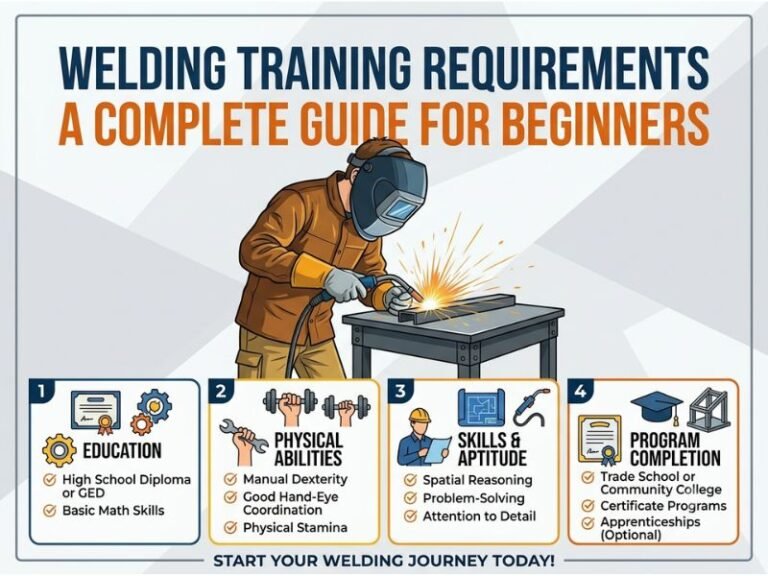
Prerequisites vary. Some introductory courses accept beginners, while advanced controller courses expect experience with industrial robots or welding.
Helpful preparation includes:
- Basic welding knowledge and familiarity with joint types
- Comfort reading measurements, drawings, and weld symbols
- Basic computer skills and logical problem-solving
- Awareness of electrical and mechanical hazards
- Experience with production quality requirements
A manual welder often brings valuable process knowledge but may need to develop robot motion and controller skills. An automation technician may understand robots and electrical systems but need deeper knowledge of weld appearance, joint fit-up, and process parameters. The best learning plan fills the student’s weakest area rather than repeating what the student already knows.
Possible job directions include robotic welding programmer, robot operator, welding automation technician, robotic cell technician, manufacturing technician, welding engineer assistant, and automation integrator support. Job titles vary by company. Some positions combine programming with fixture maintenance, quality checks, preventive maintenance, or production supervision.
Common Programming Mistakes
Teaching points without a path strategy
Recording points one at a time without considering the complete motion can create abrupt transitions, unnecessary travel, and collision risks. Planning the path first usually produces cleaner and more maintainable programs.
Ignoring torch orientation
A point may be in the correct location while the torch angle is wrong. This can cause poor fusion, inconsistent bead shape, excess spatter, or contact with the joint. Position and orientation must be evaluated together.
Using the wrong frame
Frame errors can shift an entire program or cause the robot to move unexpectedly after a fixture adjustment. A programmer should verify frame definitions and understand which frame each instruction references.
Skipping dry runs
Running a new program immediately at production speed is unsafe and inefficient. Dry runs reveal many problems before an arc is established. Reduced-speed verification should be treated as a normal programming step, not as an optional precaution.
Changing several variables at once
If a weld is poor, changing speed, voltage, wire feed, torch angle, and position simultaneously makes the cause difficult to identify. Controlled troubleshooting changes one meaningful factor at a time when conditions allow.
Failing to document changes
Unrecorded edits create confusion during later maintenance. A program backup, revision note, and clear description of the change help prevent the accidental return of an older defect.
Limitations of Robotic Welding Programming
Training cannot eliminate limitations caused by part design, inconsistent fit-up, inadequate fixtures, poor material preparation, or an unsuitable welding process. A robot repeats the conditions it receives; it does not automatically correct every upstream problem.
Robotic welding is also less attractive for some low-volume or highly variable work. Programming and fixturing take time, and a manual welder may be more flexible for one-off parts or frequent design changes. Automation tends to deliver stronger value when production volume, repeatability, access, and part presentation justify the setup effort.
Advanced functions such as seam tracking, vision guidance, coordinated positioners, offline programming, and adaptive control require additional training. A beginner course should not imply that basic pendant programming qualifies someone to design or validate a complete automated system.
Finally, a certificate does not replace supervised production experience. Employers may still expect knowledge of weld inspection, preventive maintenance, safety procedures, and the specific controller installed in the facility.
FAQ About Robotic Welding Programming Training
How long does robotic welding programming training take?
Duration depends on the starting skill level, controller, welding process, and course scope. A focused controller class may take several days, while a broader technical program can take weeks or longer. The important measure is not calendar length alone but whether the student receives enough practice to program, test, troubleshoot, and document a complete weld cycle.
Do I need welding experience before learning robot programming?
Not always. Introductory programs may teach both welding fundamentals and robot operation. However, prior welding experience makes it easier to understand torch angle, joint access, bead appearance, defects, and process adjustments. A person without welding experience should choose a course that explicitly includes those topics.
Is robotic welding programming different for each robot brand?
Yes. The concepts of frames, tools, points, motion types, and weld instructions transfer between brands, but controller menus, syntax, file structures, and command names can differ. Training on the exact brand used by an employer is the most direct preparation.
Can online training qualify me to program a welding robot?
Online training can build theoretical knowledge and introduce programming logic. It is less effective for developing physical skills such as setting a tool center point, checking clearance, managing a torch package, proving motion, and evaluating a live weld. For job readiness, supervised hands-on practice is usually necessary.
What should a beginner learn first?
A beginner should start with cell safety, robot coordinate systems, tool and work frames, basic motion, teach pendant operation, and welding-process fundamentals. After that foundation, the student can learn weld schedules, sensing, positioners, troubleshooting, and program optimization.
Does a training certificate guarantee a robotic welding job?
No. A certificate shows course completion, but employers may also evaluate welding ability, mechanical and electrical reasoning, safety behavior, troubleshooting, documentation, and experience with their equipment. A portfolio of supervised projects or documented practical competencies can make training more meaningful.
How can I practice without access to a robot?
Simulation software, controller demonstrations, programming exercises, welding theory, and fixture-layout practice can build useful background. A student can also study coordinate systems, read robot manuals, and analyze sample paths. Physical access is still needed to develop complete cell-operation competence.
Conclusion
Effective Robotic welding programming training combines robot-controller skills, welding knowledge, safety, hands-on practice, and disciplined troubleshooting. I would choose a program that matches the target equipment, includes real programming tasks, evaluates practical performance, and explains how motion decisions affect weld quality. That preparation gives a student or employer a stronger foundation for safe, repeatable, and maintainable robotic production.