Virtual Reality Welding Training: Key Facts and Helpful Guidance
Many people assume welding simulation is mainly a high-tech way to practice holding a torch. What matters more is whether the system teaches sound technique, gives useful feedback, and connects safely to real welding standards.
Virtual reality welding training can help beginners build coordination, instructors assess technique, and employers introduce welding concepts without immediately consuming metal, gas, electrodes, or shop time. It does not replace every part of hands-on instruction, but it can make early practice more structured and repeatable.
I will explain how the technology works, what it can teach, where it falls short, how to evaluate a program, and how students or employers can combine simulation with real welding practice.
What virtual reality welding training is
Virtual reality welding training uses a headset, simulated welding tool, tracking sensors, and specialized software to recreate welding tasks in a three-dimensional environment. The learner may select a process, material, joint, position, and difficulty level. The system then tracks movements and compares performance with defined training targets.
Depending on the platform, a learner may practice:
- Tool angle and travel direction
- Travel speed and hand stability
- Work angle and electrode or torch positioning
- Arc or torch distance
- Joint alignment and weld placement
- Welding positions such as flat, horizontal, vertical, or overhead
- Bead consistency and coverage
- Safety procedures and equipment selection
The simulated environment may include a virtual workpiece, welding booth, tools, protective equipment, and visual or audio indicators. Some systems use physical mock tools that resemble a welding gun, electrode holder, or torch. Others use tracked controllers or purpose-built hardware.
The goal is not simply to make welding look realistic. A useful system translates actions into understandable feedback. For example, it might show that a learner moved too quickly, held an incorrect angle, started outside the joint, or failed to maintain a consistent path.
How VR welding simulation works
A typical session begins with equipment setup and calibration. The learner puts on the headset, selects a lesson, and identifies the virtual workpiece or joint. The program may provide an instructor-selected assignment or allow the learner to choose a process and difficulty level.
Tracking movement and position
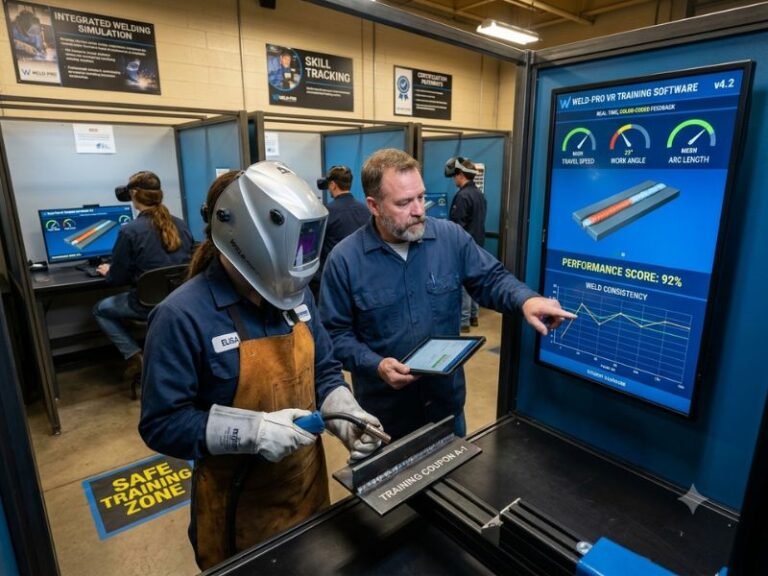
Tracking hardware records the position and movement of the tool, the learner’s head, and sometimes the hands or body. The software uses that information to estimate whether the learner is maintaining an appropriate work angle, travel speed, distance, and path.
Good calibration matters. If the tool is not tracked accurately, feedback can be confusing and scores may not reflect actual performance. A training provider should have a clear startup procedure and a way to recalibrate equipment when tracking drifts.
Receiving performance feedback
Feedback may appear during the exercise, immediately afterward, or in an instructor dashboard. Common feedback categories include path accuracy, speed, angle, distance, start and stop technique, and bead placement.
Instant feedback can help a student correct a mistake before repeating it many times. Delayed feedback can encourage independent observation and make an instructor’s review more meaningful. I consider both useful when the learner can understand what changed and how to improve it.
Repeating a task
Simulation makes repetition simple. A learner can restart a joint without cutting new material, resetting equipment, or waiting for a workpiece to cool. That makes it practical for practicing basic motion and sequencing before moving to a live arc.
However, repetition only helps when the task is performed correctly. Repeating an inaccurate movement can reinforce poor habits, so instructor review and occasional hands-on checks remain important.
What learners can practice
VR welding lessons are most useful for skills that depend on movement, sequence, recognition, and decision-making. They can also introduce the logic behind welding tasks before a student works with heat, electricity, fumes, and molten metal.
Core manipulation skills
Beginning learners can practice positioning a tool at a joint, following a line, controlling travel speed, and stopping at the correct location. These actions may appear simple, but coordinating vision, hand movement, body position, and attention takes practice.
Simulation can also make errors visible. A student who believes a hand is steady may see excessive movement on a replay or performance display. That information gives an instructor a starting point for correction.
Joint and position practice
Programs may include fillet welds, groove welds, lap joints, T-joints, butt joints, and other configurations. Available exercises depend on the software and hardware. The learner may also move from flat work to more demanding positions that require different body positioning and control.
The virtual joint should not be treated as a perfect substitute for a physical joint. Real material has surface condition, fit-up variation, distortion, heat response, and other characteristics that simulation may simplify.
Process awareness
Some systems introduce processes such as shielded metal arc welding, gas metal arc welding, flux-cored arc welding, or gas tungsten arc welding. They may show different equipment, consumables, settings, or visual results.
A simulation can explain what a process is designed to do, but learners still need real equipment instruction to understand actual arc behavior, sound, heat, puddle control, wire or electrode response, and machine operation.
Safety and work preparation
Training software may include steps such as selecting protective equipment, inspecting a workspace, checking connections, positioning a workpiece, and responding to unsafe actions. These lessons can reinforce the idea that welding begins before the arc starts.
Still, a virtual safety check cannot replace a physical hazard assessment. Real shops contain fire risks, compressed gas cylinders, fumes, electrical hazards, sharp edges, noise, and moving equipment. Students must learn and follow the safety rules of the actual facility.
Benefits of virtual reality welding training
Lower material consumption
Traditional practice uses metal, electrodes, wire, shielding gas, electricity, and consumable parts. Simulation can reduce the amount of material used during early skill development. That may help schools and employers provide more repetitions without treating every mistake as wasted inventory.
Reduced consumption does not mean zero cost. Hardware, software licenses, support, space, updates, and instructor time all contribute to the total investment.
Safer early practice
Virtual training can let a beginner practice movements without immediate exposure to arc flash, heat, fumes, sparks, electrical energy, and molten metal. It is particularly useful for orientation and basic coordination before supervised live work begins.
Safety improves only within the limits of the simulation. A learner still needs physical instruction before operating actual welding equipment.
Immediate, repeatable feedback
A simulator can apply the same evaluation criteria to repeated attempts. That consistency helps a learner compare one attempt with another rather than relying only on a general impression from an instructor.
Feedback is most valuable when it is specific. “Improve technique” is less useful than “maintain a steadier travel speed” or “keep the tool aligned with the joint.”
Flexible access
A training center can schedule simulation sessions outside the times reserved for welding booths. Employers may use it for onboarding, refresher practice, or pre-screening, provided the evaluation is fair and connected to job requirements.
Some platforms also store scores or session records. Those records can help instructors identify patterns, although a score should not be treated as a complete measure of welding ability.
More practice opportunities for beginners
New students can be hesitant around live equipment. A virtual environment gives them a way to become familiar with terminology, tool placement, joint direction, and basic movement before the pressure of a real booth is added.
I see this as a preparation advantage rather than a replacement for physical skill building. Confidence earned in simulation must be tested against real conditions.
Limitations and what VR cannot reproduce
The central limitation is that simulation models welding rather than creating a real weld. A learner may achieve an excellent virtual score without yet being able to produce an acceptable physical weld.
Heat and molten metal
Real welding involves heat transfer, puddle behavior, solidification, distortion, burn-through risk, and changes in material appearance. These physical effects are difficult to reproduce completely through a headset and tracked tool.
Simulation may show a visual result, but it cannot provide the full sensory experience of heat, glare, arc sound, fumes, vibration, or the changing feel of a live puddle.
Material and fit-up variation
Physical workpieces are not always clean, flat, or perfectly aligned. Joint gap, surface contamination, thickness, position, and fixture quality can affect the outcome. A virtual exercise may use fixed conditions that do not prepare a learner for every shop situation.
Actual equipment operation
Welding machines, regulators, cylinders, feeders, torches, leads, clamps, and ventilation systems have physical controls and maintenance requirements. Simulation can introduce their functions, but hands-on instruction is required to operate and inspect them safely.
Limited judgment in real conditions
Experienced welders constantly observe the workpiece, listen to the arc, monitor the puddle, adjust technique, and respond to changing conditions. A simulator can teach parts of that decision-making process, but it may not reproduce the full complexity of production work.
For these reasons, virtual training works best as a supplement to classroom instruction, supervised shop practice, and formal assessment where applicable.
Choosing a VR welding program
A good purchasing decision starts with the learning objective. A school seeking beginner orientation has different needs from a manufacturer training experienced workers on a specific joint or procedure.
Match the platform to the curriculum
Ask whether the available exercises support the processes, joint types, positions, and terminology used in the actual program. A visually impressive platform may be a poor choice if it does not align with the curriculum or workplace procedures.
Review whether instructors can assign lessons, adjust difficulty, monitor progress, and provide comments. Administrative tools matter because technology is only effective when it fits ordinary teaching workflows.
Evaluate feedback quality
Look for clear measurements and explanations rather than a single unexplained score. Useful feedback should identify what the learner did, why it matters, and what action may improve the next attempt.
Ask how the system handles borderline performance. If small tracking variations produce dramatically different results, instructors may struggle to trust the data.
Check hardware and maintenance needs
Before adoption, confirm the space, computer requirements, headset compatibility, tracking area, cleaning procedure, storage, replacement parts, and technical support process. A program that sits unused because setup is difficult will not provide meaningful value.
Shared headsets also require a practical hygiene policy. Face-contact surfaces should be cleaned according to the manufacturer’s instructions, and users should understand how equipment is handled between sessions.
Consider accessibility and comfort
Headsets can cause discomfort, motion sickness, eye strain, or fatigue for some users. A program should offer breaks, clear supervision, and alternatives when a learner cannot comfortably use the equipment.
Accessibility also includes readable interfaces, understandable audio and visual cues, adjustable lesson pacing, and physical arrangements that allow students to participate safely.
Ask how success is validated
A vendor should explain what each score represents and how instructors are expected to interpret it. I would also ask whether the program is intended for practice, curriculum support, assessment, or all three. Those uses require different levels of evidence and oversight.
How to use simulation effectively
VR produces better results when it is part of a planned progression instead of an isolated technology demonstration.
- Teach the concept first. Explain the process, joint, tool, body position, safety requirements, and performance target before the headset goes on.
- Demonstrate the movement. A short instructor demonstration gives the learner a reference point that software instructions may not provide.
- Assign a focused exercise. Practice one or two skills at a time, such as travel speed and path control, instead of overwhelming a beginner with every metric.
- Review the feedback. Have the learner describe the error and identify one change for the next attempt.
- Repeat with a purpose. Repetition should test a specific correction, not simply chase a higher score.
- Transfer the lesson to live equipment. Move to supervised hands-on work when the learner understands the task and can follow physical safety procedures.
- Compare virtual and physical performance. Use the difference to refine instruction rather than assuming the virtual result predicts the real result perfectly.
Short, deliberate sessions are generally more useful than long sessions filled with unfocused retries. I would also preserve time for discussion, because interpretation is where raw performance data becomes instruction.
Common mistakes to avoid
Treating a high score as certification
A simulator score is evidence of performance inside a defined virtual exercise. It is not automatically a welding qualification, license, certification, or proof of job readiness. Formal requirements depend on the employer, training provider, code, standard, or testing authority involved.
Skipping live practice
Simulation should not become a reason to delay physical welding indefinitely. Learners need supervised exposure to actual equipment, materials, heat, arc behavior, ventilation, and shop procedures.
Using generic lessons for specialized work
Production welding may involve specific materials, thicknesses, joint designs, positions, procedures, and quality requirements. Generic simulation can establish foundations but may not reflect a particular employer’s work.
Ignoring instructor involvement
Automated feedback cannot always distinguish a meaningful error from a tracking issue or explain the best correction for a particular learner. Instructor observation remains important, especially when a student repeatedly receives poor results.
Measuring only speed
Fast completion is not the same as good technique. Training should balance control, consistency, joint coverage, safety, and quality. A system or instructor that rewards speed without context may encourage habits that create defects.
Failing to connect training to safety
A learner can become absorbed in the virtual task and forget that real welding requires protective clothing, ventilation, fire prevention, equipment inspection, and supervised procedures. Safety needs to be discussed as part of every transition to live work.
Who benefits most from VR welding training?
Beginning students are an obvious audience because simulation can introduce vocabulary, body positioning, tool control, and sequencing before live practice. It can also help students who need additional repetitions but have limited access to booths.
Career and technical education programs may use it to supplement classroom teaching and manage high enrollment. Community colleges and workforce programs may use it during orientation or to help learners decide whether welding is a suitable field.
Employers can use simulation for onboarding, refresher instruction, process familiarization, and structured practice before an employee performs a task in production. Its value is strongest when lessons reflect actual job expectations.
Experienced welders may benefit from scenario practice or new-process orientation, but simulation should not be assumed to improve advanced performance unless the exercises are designed for that level.
Cost, access, and return on investment
The cost of a system may include hardware, software, licenses, installation, maintenance, instructor training, replacement parts, and technical support. A lower purchase price does not necessarily mean a lower long-term cost.
To evaluate value, compare the platform with the specific problem it is meant to solve. Possible benefits include more repetitions, lower consumable use, reduced booth demand, safer orientation, standardized exercises, and better progress tracking.
These benefits should be measured realistically. For example, an institution might track learner participation, time spent practicing, instructor workload, material consumption, transition to live welding, and performance on relevant hands-on assessments.
I would avoid promising a fixed financial return without local data. The best choice depends on enrollment, facility capacity, curriculum design, staffing, and whether learners actually use the system consistently.
FAQ about virtual reality welding training
Is virtual reality welding training suitable for beginners?
Yes. It can introduce tool control, joint direction, body positioning, safety concepts, and basic welding terminology in a controlled setting. Beginners still need classroom instruction and supervised hands-on practice before using actual welding equipment.
Can VR welding training replace a welding instructor?
No. Software can provide repeatable feedback, but an instructor interprets performance, corrects misunderstandings, connects lessons to physical work, and supervises safety. Instructor involvement is especially important when virtual results and live performance do not match.
Does VR welding training teach real welding skills?
It can teach transferable elements such as movement, coordination, sequencing, and awareness of tool angle or travel speed. It does not fully reproduce heat, puddle behavior, material variation, fumes, arc sound, or physical equipment operation, so real welding practice remains necessary.
What welding processes can a VR simulator cover?
Available processes vary by platform. Some systems may represent shielded metal arc welding, gas metal arc welding, flux-cored arc welding, or gas tungsten arc welding. Buyers should verify the exact processes, joints, positions, and exercises included rather than relying on a general product description.
Can a VR welding score prove job readiness?
No. A score describes performance in that simulator and under its defined conditions. Job readiness also involves safe equipment operation, physical weld quality, procedure knowledge, reliability, and the requirements of a particular employer or qualification system.
How long should a VR welding practice session last?
There is no universal duration. Short, focused sessions with feedback and breaks are often more useful than extended sessions without a clear objective. The appropriate schedule depends on the learner, lesson complexity, equipment comfort, and instructor plan.
What should a school ask before buying a simulator?
Ask about curriculum alignment, feedback metrics, instructor controls, hardware requirements, maintenance, technical support, accessibility, hygiene, data storage, lesson updates, and the expected role of simulation in hands-on training. Also ask how virtual performance will be validated against physical welding tasks.
Conclusion
Virtual reality welding training is most effective as a structured bridge between explanation and hands-on work. It can provide safe repetition, measurable feedback, and efficient practice for foundational skills, but it cannot recreate every physical condition of a live weld or replace qualified instruction. I recommend choosing a system that fits the curriculum, using feedback to guide specific corrections, and validating progress with supervised work on real equipment.