Benefits of Virtual Reality Welding Training: Practical Guide
Many people assume welding skill is built only beside a live arc with expensive equipment consumables and a steady supply of practice metal That experience remains essential but.
That is where virtual reality VR can add practical value A headset and welding simulator cannot fully reproduce heat smoke puddle behavior or the responsibility of working on.
In this guide I explain the main Benefits of virtual reality welding training how VR fits into a welding education program where it falls short and what instructors.
Benefits of Virtual Reality Welding Training
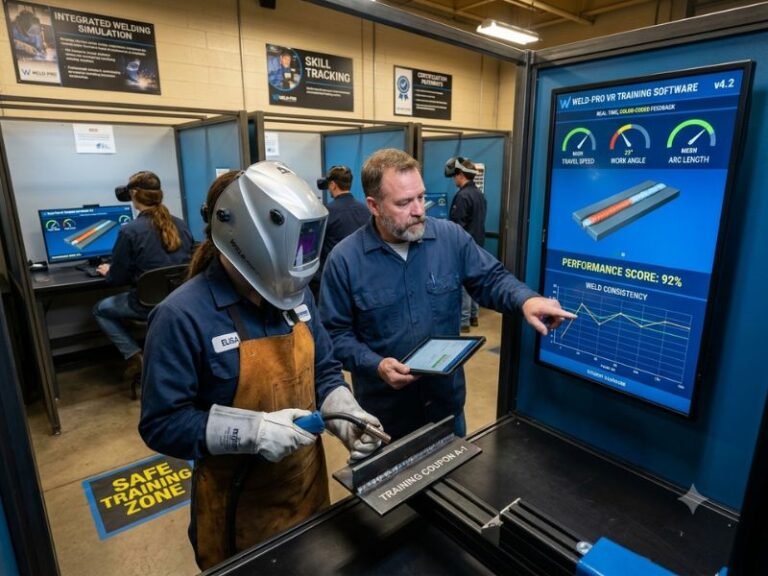
Virtual reality welding training uses a headset, controllers or a simulated welding torch, software, and sometimes a physical workpiece or tracking system to recreate welding tasks in a digital environment. The learner practices positioning, travel speed, work angle, travel angle, arc length, and process decisions while the system records performance.
The strongest benefit is controlled repetition. A beginner can repeat the same joint, position, or movement immediately instead of waiting for a booth, material, instructor, or equipment reset. That additional practice can help build procedural confidence before the learner works with a live arc.
1. Safer early practice
Welding carries real hazards including arc radiation heat fumes sparks electric shock compressed gases fire and hot metal VR removes most of those immediate physical hazards during the.
That does not make VR a substitute for safety instruction. Students still need training in personal protective equipment, ventilation, fire prevention, machine operation, electrical safety, and emergency procedures. I view simulation as a low-risk environment for learning task sequences and correcting basic errors, not as a safety certification by itself.
2. More practice with less consumable waste
Traditional practice consumes electrodes, wire, shielding gas, plate, coupons, grinding discs, and electricity. Scrap is a normal part of welding education, but repeated beginner mistakes can make training expensive. Digital practice reduces the cost of early errors because the learner can restart a scenario without discarding physical material.
This is especially useful for schools workforce programs and employers managing limited shop capacity A student can spend time learning how to approach a joint maintain a consistent.
3. Immediate, objective feedback
An instructor may identify a long arc, inconsistent travel speed, poor torch angle, or wandering bead by observation. VR software can supplement that observation with recorded measurements and visual prompts. Depending on the system, feedback may cover path accuracy, speed, angle, distance, pauses, bead placement, and task completion.
Objective feedback helps turn a vague correction into a specific action. “Keep the movement steady” is useful, but a display showing repeated speed changes or a path drifting outside the target area gives the learner something concrete to correct.
Feedback should still be interpreted by a qualified instructor. A high simulator score does not automatically mean a sound weld. Software may measure movement well while missing issues involving real puddle behavior, penetration, contamination, or the finished weld’s integrity.
4. Faster development of muscle memory
Welding requires coordinated movement rather than memorized information alone. The learner must manage body position, hand stability, travel direction, torch or electrode angle, and visual attention at the same time. Repetition in VR can help establish a basic movement pattern before heat and arc light add complexity.
That early repetition is valuable because physical booths often create pressure. A beginner may focus so intensely on not ruining a coupon that there is little attention left for posture or travel consistency. Simulation allows deliberate practice: repeat one movement, change one variable, review the result, and try again.
5. Consistent instruction and assessment
Different instructors may describe the same performance issue in different ways, and busy labs may not provide identical practice opportunities to every student. A standardized VR exercise gives learners the same joint geometry, position, sequence, and scoring framework.
Consistency supports clearer progress tracking. An instructor can compare a learner’s early attempts with later attempts, identify recurring problems, and assign targeted practice. Employers can also use structured scenarios during orientation or pre-employment training, provided the assessment is validated against real job requirements.
6. Greater access to difficult scenarios
Some welding tasks are costly, awkward, hazardous, or difficult to schedule in a training shop. A simulator may let students practice overhead, vertical, confined, or unusual joint scenarios without immediately creating the physical conditions required for each exercise.
VR can also expose a learner to different welding processes, equipment interfaces, joint designs, and jobsite decisions. That exposure is useful for orientation, although exposure should not be confused with qualification. A person who practices a simulated pipe weld still needs appropriate hands-on training and testing before performing that work professionally.
7. Better learner engagement
Interactive practice can make technical instruction more engaging for students who struggle with lecture-based lessons. A simulation provides a visible task, an immediate result, and a clear opportunity to improve. Progress scores and repeatable challenges can encourage practice without turning training into a game disconnected from welding standards.
Engagement matters because time on task matters. Still, I would prioritize instructional accuracy over impressive graphics. A realistic-looking environment is not automatically a useful welding simulator. The system must reinforce correct technique and connect digital tasks to shop expectations.
How VR Welding Training Works
A typical session begins with orientation The learner puts on the headset learns how to hold the virtual torch or tracked tool selects a process or exercise and.
The software then creates a digital welding environment It may display a joint workpiece electrode wire torch travel path and operating controls The learner performs the task while.
After the attempt, the learner receives a score, replay, or performance report. An instructor can use that information to discuss the result and assign a focused retry. A productive cycle usually looks like this:
- Review the joint, process, settings, and safety requirements.
- Perform the simulated weld without unnecessary interruption.
- Review movement data and instructor observations.
- Identify one or two priority corrections.
- Repeat the exercise with those corrections in mind.
- Transfer the skill to a physical welding booth.
The transfer step is essential. Digital practice should lead toward safe work with real equipment, not become an isolated activity where learners chase scores without understanding welding results.
What Skills Can VR Teach Well?
VR is particularly effective for skills that depend on movement, sequencing, visual alignment, and decision-making. It can teach or reinforce:
- Work angle and travel angle
- Travel speed and movement consistency
- Arc-length concepts and torch-to-work distance
- Starting and ending a bead
- Following a joint line or designated path
- Body positioning and approach to a joint
- Process and parameter selection in simulated scenarios
- Recognition of common technique errors
- Basic equipment setup sequences
- Response to changing task conditions
It can also help instructors explain why a particular movement matters. For example, a replay may show how a learner’s travel path changes when the torch angle shifts. That visual connection can be easier to understand than a verbal explanation alone.
Where hands-on practice remains necessary
Real welding introduces physical conditions that simulation cannot reproduce perfectly. Heat changes hand comfort and body position. The weld pool reacts to gravity, contamination, joint fit-up, current, voltage, shielding, material thickness, and surface condition. Arc light, sparks, fumes, noise, and restricted visibility also affect performance.
Students must eventually learn to recognize actual bead appearance, puddle behavior, penetration, fusion, porosity, undercut, overlap, slag inclusion, distortion, and other weld conditions. They also need practice handling consumables, setting up machines, preparing joints, cleaning surfaces, inspecting work, and responding to equipment problems.
For these reasons, VR works best as a supplement to instructor-led shop training. It can prepare a learner for hands-on work and reinforce technique afterward, but it cannot independently prove that a person is ready for production welding or a formal performance qualification.
VR Versus Traditional Welding Training
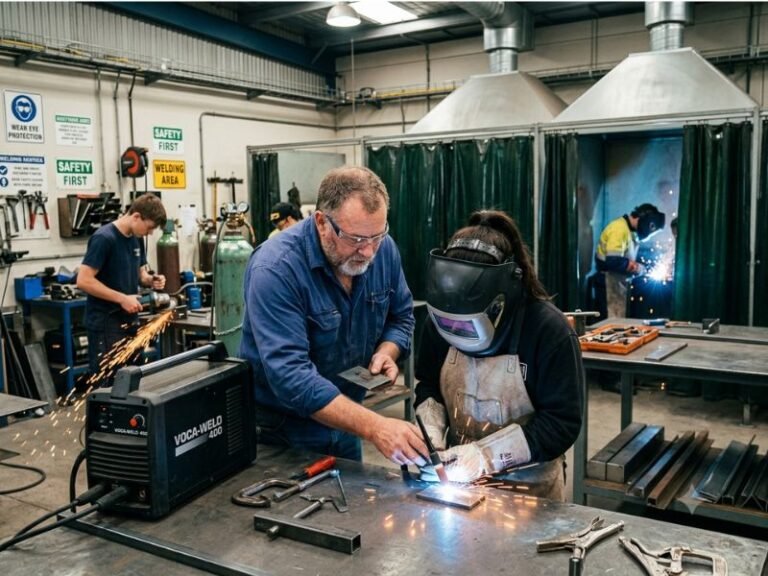
Traditional welding training offers the physical realism that simulation cannot fully match. Students learn how metal heats, how the puddle moves, how the arc sounds, and how small setup changes affect the finished weld. It is indispensable for building job-ready skill.
VR offers advantages in repetition, safety, tracking, and access. The comparison below shows how the two methods differ:
| Training factor | Virtual reality | Traditional hands-on practice |
|---|---|---|
| Early mistakes | Usually low physical and material consequences | May create scrap, hazards, or equipment problems |
| Repetition | Fast resets and repeatable scenarios | Limited by booths, materials, time, and setup |
| Physical realism | Simulated heat, motion, and visual conditions | Real arc, puddle, heat, sound, fumes, and metal |
| Performance data | Can record movement and timing metrics | Often depends more on instructor observation and inspection |
| Cost per early attempt | Often lower after the system is purchased | Includes consumables, energy, equipment use, and cleanup |
| Qualification evidence | Useful for preparation, not usually sufficient alone | Required for demonstrating real welding performance |
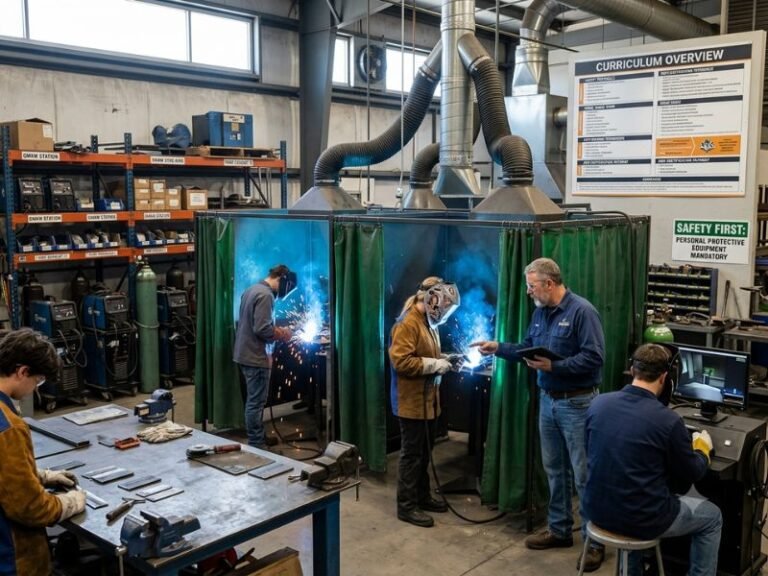
The most effective programs combine both approaches. VR can handle orientation, repetition, and targeted correction. The physical lab can focus on heat management, weld-pool control, actual joint preparation, inspection, and production-quality work.
How to Add VR to a Welding Program
Technology produces better results when it solves a defined training problem. Before purchasing a system, I would identify the specific weakness it needs to address. A school may need more practice capacity. An employer may need a safer onboarding tool. An instructor may need better visibility into travel speed and angle.
Start with learning objectives
Write measurable objectives before comparing products. Examples include maintaining a target travel path, selecting a process for a given joint, completing a setup sequence, or correcting an excessive travel-speed error. Objectives make it easier to judge whether a simulator supports instruction rather than merely offering an entertaining experience.
Match exercises to the curriculum
VR exercises should align with the welding processes and positions students will actually encounter. Check whether the system supports relevant processes such as shielded metal arc welding, gas metal arc welding, gas tungsten arc welding, or flux-cored arc welding. Also examine available joint types, materials, positions, and parameter controls.
A mismatch can create confusion. If classroom instruction emphasizes one process but the simulator presents simplified or unrealistic controls, students may develop habits that an instructor later has to undo.
Plan an instructor-led session
Set a time limit for each simulation session and pair it with a clear debrief Learners should know what they are practicing what the score means and which.
Short, focused sessions are often more useful than long sessions filled with repeated attempts and little reflection. The purpose is deliberate practice, not simply time spent wearing a headset.
Use a staged progression
A practical progression may begin with tool handling and body position, move to travel path and angle, then introduce process settings, joint variations, and more demanding positions. Physical booth work should be introduced before learners become dependent on simplified digital cues.
After a student completes a VR exercise, require a related physical task. The instructor can compare the simulated performance with the real result and discuss which skills transferred and which did not.
How to Evaluate a VR Welding Simulator
Not every product offers the same instructional value. I would evaluate the system using the following criteria:
- Technical accuracy: Does the simulation represent the selected welding process, joint, position, and operating controls credibly?
- Tracking quality: Does it detect torch or electrode movement, angle, distance, and speed consistently?
- Feedback clarity: Can learners understand what went wrong and what to change?
- Instructor controls: Can instructors create assignments, review attempts, and monitor progress?
- Curriculum fit: Do the scenarios support the school’s or employer’s learning objectives?
- Hardware durability: Can the headset, controllers, mock torch, and work surface withstand frequent use?
- Accessibility: Can the system accommodate different body sizes, vision needs, physical abilities, and learning preferences?
- Software support: Are updates, troubleshooting, training, and replacement parts available?
- Data and privacy: How are learner records stored, exported, and protected?
- Total cost: Does the budget include hardware, licenses, maintenance, instructor training, space, and replacement equipment?
A product demonstration should include an actual learner task not just a marketing presentation Ask to see the performance report the scoring logic the reset process and the instructor dashboard It is also wise to compare simulator.
Limitations and Common Mistakes
VR welding training has meaningful limitations. Recognizing them prevents unrealistic expectations and improves implementation.
Treating VR as a replacement for the shop
This is the most serious mistake. A simulator cannot establish complete readiness for welding in a production environment. Students need physical practice with real equipment, materials, hazards, inspection procedures, and job conditions.
Focusing on scores instead of technique
A score can motivate practice, but it is only a measurement produced by software. Learners may try to optimize the score rather than understand the welding principle behind it. Instructors should explain why a movement matters and connect the digital result to weld quality.
Ignoring ergonomics and motion sickness
Some users experience eye strain, dizziness, discomfort, or fatigue in immersive environments. Sessions should be reasonably short, the equipment should fit correctly, and learners should be allowed to stop if symptoms occur. Physical layout also matters because users need adequate clearance and stable footing.
Using unrealistic settings
If the interface oversimplifies machine controls or presents an inaccurate relationship between settings and results, students may learn the wrong lesson. A visually impressive system can still be weak as a technical teaching tool.
Skipping instructor training
Instructors need to understand the simulator’s scoring system, limitations, calibration, and reporting features. Without that knowledge, feedback may be inconsistent or overly dependent on software prompts.
Failing to maintain equipment
Dirty lenses, tracking problems, worn controllers, outdated software, and poor calibration can reduce confidence in the training. A maintenance schedule and a simple process for reporting faults should be established before regular use begins.
Who Benefits Most from VR Welding Training?
VR can be valuable for several groups, but the specific benefit differs by setting.
Beginning students
Novices can rehearse basic movements and terminology before facing the pressure of a live arc. This may help instructors spend physical lab time on higher-value corrections rather than repeating the same introductory explanation.
Technical schools and workforce programs
Programs with limited booths, high enrollment, or tight material budgets can use simulation to expand practice opportunities. VR may also help demonstrate scenarios that are difficult to stage safely in a classroom.
Employers and apprenticeship programs
Manufacturers, fabrication shops, and contractors can use VR for orientation, screening, refresher training, or targeted practice. It may help a new employee become familiar with task sequences before entering a production area, but workplace policies and qualification requirements still control the final decision.
Experienced welders
Advanced users may benefit from unusual joint scenarios, process familiarization, or practice before a high-consequence assignment. The value depends on how closely the simulator reflects the actual work and whether the learner needs physical feedback that VR cannot provide.
Cost, Return, and Implementation Questions
The financial case for VR depends on more than the headset price. A realistic budget includes hardware, software subscriptions or licenses, physical mock tools, technical support, updates, replacement parts, instructor time, and space. It should also account for the cost of training staff to use the system effectively.
Potential returns include lower consumable waste during early practice, fewer equipment conflicts, more consistent assessment, reduced beginner exposure to hazards, and better use of instructor time. These benefits are not guaranteed. They depend on adoption, curriculum integration, reliable equipment, and a clear connection between simulation performance and hands-on outcomes.
To evaluate impact, track practical measures such as time to complete introductory exercises, consumable use, booth utilization, student retention, repeated technique errors, instructor workload, and performance on related physical welds. Avoid judging success only by headset usage or average simulator scores.
FAQ: Benefits of Virtual Reality Welding Training
What are the main benefits of virtual reality welding training?
The main benefits include safer early practice, reduced consumable waste, immediate feedback, repeatable exercises, consistent assessment, increased access to difficult scenarios, and improved learner engagement. VR is most effective when it prepares students for and reinforces real welding practice.
Can virtual reality welding training replace hands-on welding?
No. VR cannot fully reproduce real heat, arc behavior, weld-pool control, fumes, sparks, material variation, joint preparation, or finished-weld inspection. It should supplement hands-on instruction rather than replace physical practice or a required welding qualification.
Is VR welding training safe for beginners?
It is generally a lower-risk way to introduce movement, equipment controls, and task sequences because it does not create a live arc or hot metal. Beginners still need formal instruction in welding safety before using real equipment, and VR sessions should be supervised appropriately.
Does VR improve welding skill?
VR can improve skills related to movement consistency, angle, travel speed, positioning, sequencing, and error recognition. The improvement is strongest when exercises are technically accurate, feedback is understood, and learners transfer the practice to real welding under instructor supervision.
How realistic is a virtual welding simulator?
Realism varies by product. Some systems provide tracked tools, physical work surfaces, process-specific scenarios, and detailed performance data. Even advanced systems simplify or approximate heat, puddle behavior, material response, and sensory conditions, so realism should be judged against the specific learning objective.
What should an instructor look for in a VR welding system?
An instructor should look for accurate process representation, reliable motion tracking, useful feedback, relevant joint and position options, curriculum alignment, durable hardware, accessible controls, strong reporting, technical support, and a clear method for connecting simulator results to physical weld performance.
Is virtual welding useful for experienced welders?
Yes, particularly for process familiarization, unusual positions, refresher practice, and scenario preparation. Experienced welders should still verify technique on the actual equipment, material, joint design, and work environment required for the job.
Conclusion
VR does not make welding training complete by itself but it can make the path to competence safer more repeatable more measurable and less wasteful The most valuable. When I evaluate Benefits of virtual reality welding training, I apply these points to the specific situation instead of relying on a one-size-fits-all assumption.